

Logging is the way to monitor the state of any machine. As per analytics, there are 21.5 billion interconnected devices in the world which are growing by 9% every year. Since each device are smart enough to perform its targeted application but what about the failure of those devices, Is there any monitoring system of that device and this leads to logging information in the proper manner.
What is logging ?
Logging is capturing real-time updates of any system and storing or properly delivering that information. Another question arises How logging is generated and how to access that.
Mostly all Embedded systems are comprised of Linux kernel and the system is programmed to store all real-time updates to its logging directory.
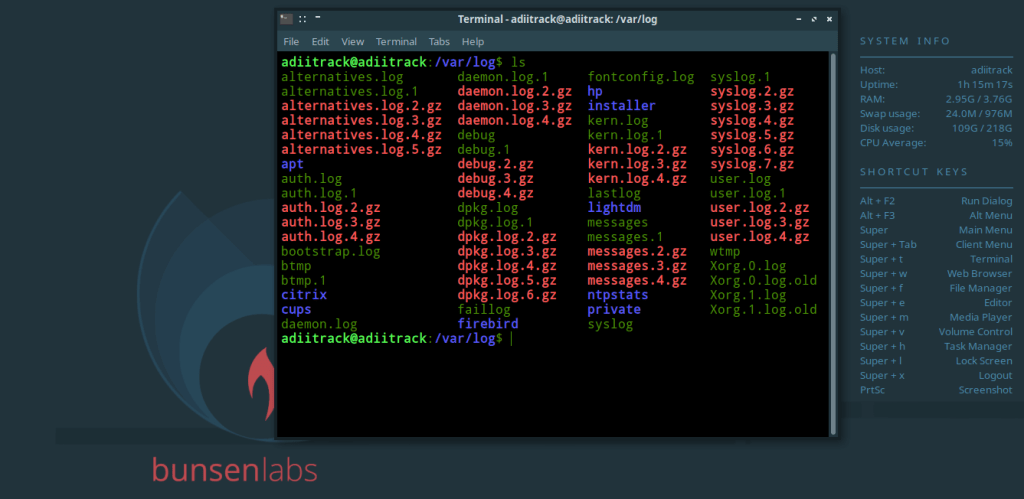
As shown above, there are a lot of log files are there, System stores it to capture all updates into files, a different application may be programmed to store their logging info to their separate directory.
Way to store logging information
Syslog is the general standard for logging systems and program messages in the Linux environment. This service constitutes the system log daemon, where any program can do its logging (debug, security, normal operation) along with the Linux kernel messages.
#include<syslog.h>
Whenever any log is sent to the system, it also needs additional information like who has sent that log and what kind of log info it is, what kind of program is logging the message.
Types of messages based on program
LOG_AUTH
    security/authorization messages
LOG_AUTHPRIV
    security/authorization messages (private)
LOG_CRON
    clock daemon (cron and at)
LOG_DAEMON
    system daemons without separate facility value
LOG_FTP
    ftp daemon
LOG_KERN
    kernel messages (these can't be generated from userprocesses)
LOG_LOCAL0 through LOG_LOCAL7
    reserved for local use
LOG_LPR
    line printer subsystem
LOG_MAIL
    mail subsystem
LOG_NEWS
    USENET news subsystem
LOG_SYSLOG
    messages generated internally by syslogd(8)
LOG_USER (default)
    generic user-level messages
LOG_UUCP
    UUCP subsystem
Types of messages based on level
LOG_EMERG
    system is unusable
LOG_ALERT
    action must be taken immediately
LOG_CRIT
    critical conditions
LOG_ERR
    error conditions
LOG_WARNING
    warning conditions
LOG_NOTICE
    normal, but significant, condition
LOG_INFO
    informational message
LOG_DEBUG
    debug-level message
Other option used along with logging
LOG_CONS
    Write directly to the system console if there is an error while sending to the system logger.
LOG_NDELAY
    Open the connection immediately (normally, the connection is opened when the first message is logged).  This may be useful, for example, if a subsequent chroot(2) would make the pathname used internally by the logging facility unreachable.
LOG_NOWAIT
    Don't wait for child processes that may have been created while logging the message.  (The GNU C library does not create a child process, so this option has no effect on Linux.)
LOG_ODELAY
    The converse of LOG_NDELAY; opening of the connection is delayed until syslog() is called.  (This is the default, and need not be specified.)
LOG_PERROR
    (Not in POSIX.1-2001 or POSIX.1-2008.)  Also log the message to stderr.
LOG_PID
    Include the caller's PID with each message.
Application
logging information by default consists of Timestamp, User information, program name than logging information although it can be customized we will use the default. Below is an example that will store log within in system log. it will store two pieces of information.
1. System information
2. Hello World from Main!
<time_stamp> <user_name> <program_name>: <logging information>
#include <stdlib.h>
#include <stdio.h>
#include <syslog.h>
/**
*
*           https://errbits.com
*           Subscribe for exciting stuff !
*
**/
int main (int argc, char *argv[])
{
   //Buffer to store system name
   char str[100];
   //pipe stream to or from a process
   FILE *cmd = popen("uname -a", "r");
   //read output of cmd and store
   while(fgets(str, 100, cmd)!=NULL)
   pclose(cmd);
   //system information
   syslog(LOG_INFO,"%s",str);
   //custom message
   syslog(LOG_DEBUG,"Hello World from Main!");
   closelog();
}
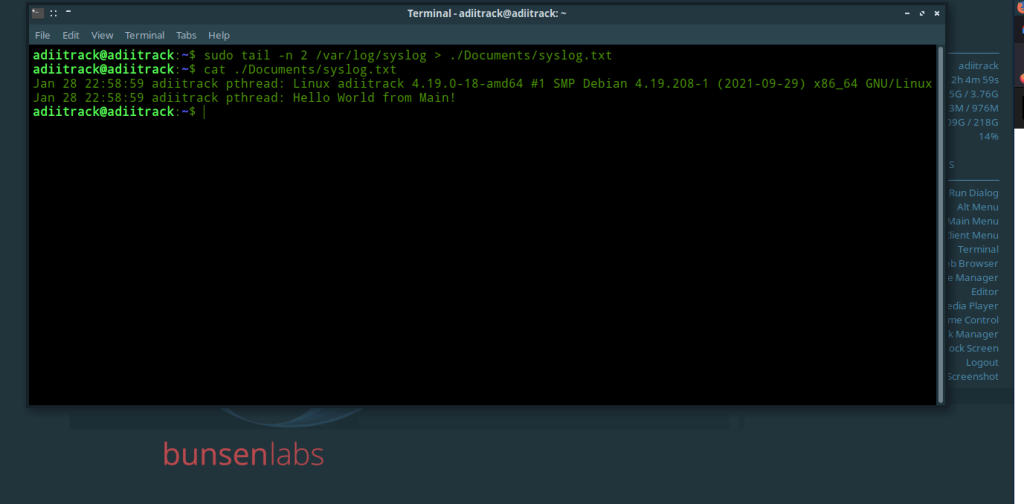
These logs are further used remotely for reporting ,Analyzing system, Performance , Behaviors and a number of things .
2 responses to “Real Time Logging for Embedded Systems and IoT”
-
-
Thank you Biraj for support. Keep Visiting and Bookmark it 🙂 .
LikeLike
-


 ErrBits
Leave a reply to adiitrack Cancel reply